
WHAT IT IS
What Tally does with a receipt
Two different things, and you choose which: keep the photo as proof next to the expense, or also request an analysis that fills the form with a proposal you review.
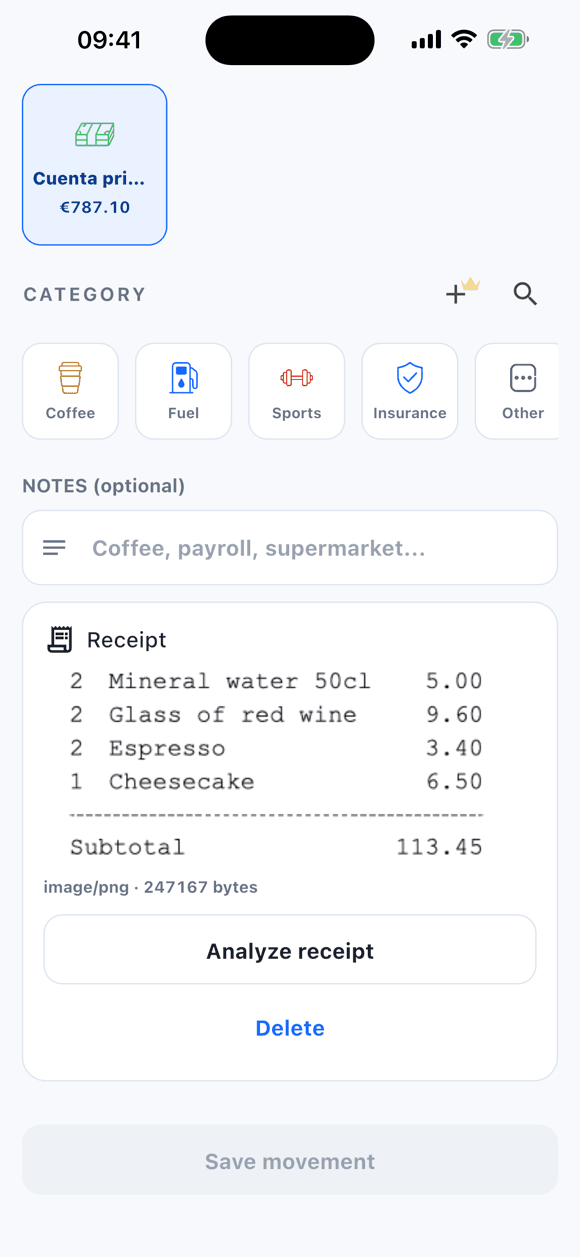
Keeping the photo needs nothing else: the image is copied into the app's private storage and linked to the movement for later. Analysis is a separate step that runs only when you tap “Analyze receipt”; attaching, opening, editing, or replacing the photo does not trigger it.
Tally does not run OCR on the device and does not scan your gallery automatically. Every analysis is an explicit action of yours.
STEP BY STEP
From receipt to expense
Take the photo or pick it from the galleryFree
From an expense form, attach a JPG or PNG image. Tally compresses it and stores it as a private file on your phone.
Tap “Analyze receipt” if you want a proposal1 free · unlimited with PRO
The compressed image travels to a secure Tally function that asks an AI model. You need a connection and a signed-in session. Free includes 1 analysis; PRO is unlimited.
Review the proposal
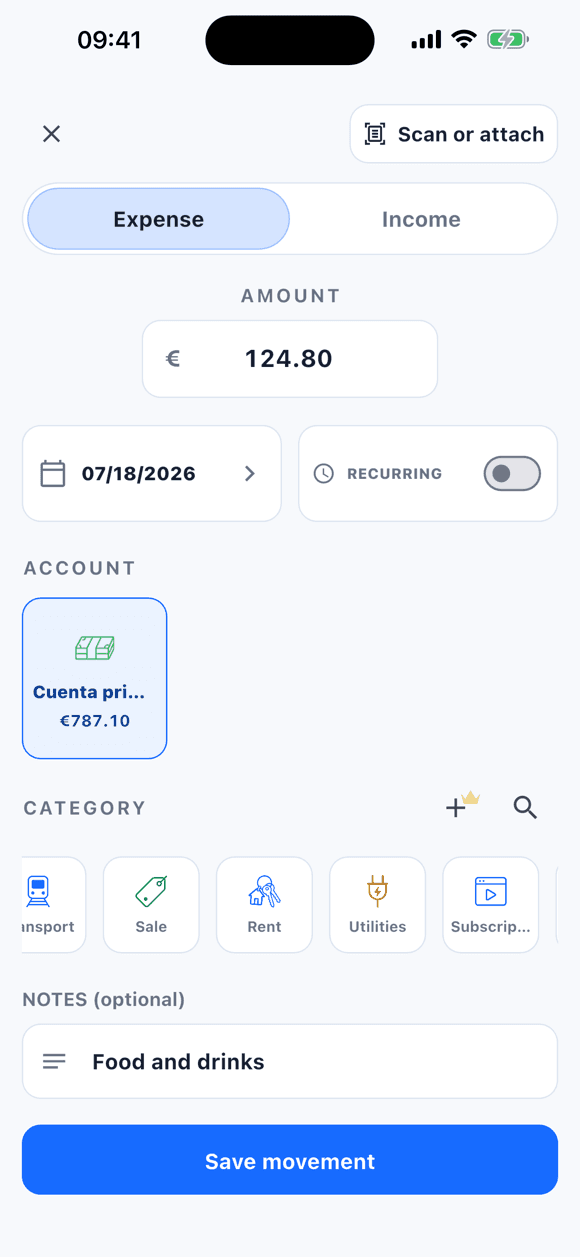
Amount, date, merchant or concept, and a suggested category fill the form. Fix whatever is needed: the proposal does not replace your decision.
Save the movement
The expense is recorded in the account you choose, with the receipt linked. You can view, replace, or delete the photo later.
THE PROPOSAL
What the analysis extracts and what it does not
| Field | What Tally does | What you review |
|---|---|---|
| Amount | Proposes the receipt total. | That it matches what you paid; edit it if not. |
| Date | Proposes the printed date. | If the receipt is unclear, use today's or fix it. |
| Merchant and concept | Proposes the store name as the concept. | Shorten or change it. |
| Category | Suggests one of your available categories. | Confirm it or pick another. |
| Account | Does not infer it. | You choose it, like for any expense. |
PRIVACY
The photo stays on your phone
Attaching a receipt does not upload it anywhere. The image only leaves the device when you tap “Analyze receipt”, and only to get the proposal.
- Photos are stored in the app's private space; Tally does not upload them to the cloud or include them in the CSV export.
- If you share the account with someone, the receipt image is not synchronized; only the encrypted metadata needed to link it to the movement.
- When analyzing, the compressed image is sent to a secure Tally function that requests the proposal from an AI model (Google Gemini). Neither the receipt nor the result is stored on Tally servers.
- If the image is too large or the analysis fails, you can keep logging the expense by hand with the photo attached.
WITHOUT ANALYSIS
It also works without analyzing anything
Many people use the receipt only as proof: they log the expense by hand and attach the photo to find it when reviewing the month, returning a product, or splitting a cost. That use is free, unlimited, and sends nothing off the phone.
Analysis is meant for long receipts or when you want to go faster: one photo, one proposal, one review.
WHO IT FITS
When it pays off
Weekly groceries
Keep the receipt next to the grocery expense and let the analysis propose the total.
Travel
Receipts in another currency, in their own event account, with the proof at hand when you get back.
Shared expenses
Attach the receipt to an expense in a shared account; the other person sees the movement and you keep the photo.
FREE AND PRO
What each version includes
Unlimited photos, 1 analysis
Attach as many receipts as you want, stored on your phone, and try AI analysis once.
Unlimited analyses
Analyze every receipt you log, plus statement import, shared accounts, and custom categories.
LIMITS
Good to know
- Analysis requires an internet connection and a signed-in session; keeping the photo does not.
- One image per movement, JPG or PNG. No multi-page scanning and no PDF.
- The proposal can be wrong with crumpled, blurry, or unusual-language receipts: that is why it always goes through your review.
- Tally does not scan your gallery or analyze anything in the background.
FAQ
Frequently asked questions
Is the receipt photo uploaded to the internet?
Only when you tap “Analyze receipt”, and only to get the proposal. Attaching, opening, editing, or replacing the photo does not send it anywhere.
How many receipts can I scan for free?
You can attach photos without limit. AI analysis includes 1 use on the free version; with Tally PRO it is unlimited.
Does Tally save the expense from the photo alone?
No. The analysis returns a proposal that fills the form; the movement is only saved when you confirm.
What if the analysis fails?
You keep logging the expense by hand with the photo attached. The same happens if the image is too large or there is no connection.
Are receipts shared in a shared account?
No. The image stays on your device; only the encrypted metadata linking the receipt to the movement is synchronized.
Keep reading
Keep going
The receipt is one of the four ways to log in Tally. These pages complete the picture.
Start with Tally
Log your first expense from a receipt
Download Tally, photograph your next receipt, and try the free analysis. Review the proposal and save.
Free · 1 AI analysis included · Account required