
THE PROBLEM
The expense that never gets logged
You tap your phone, it beeps, done. No receipt to keep and no queue to wait in, so there is none of that fifteen-second gap where you would normally log the expense. It is the payment method that most often escapes tracking.
The industry's usual answer is to connect your bank: you give access to your accounts and charges appear on their own, with their delay and their fees already applied. It works, and in exchange you hand over credentials or authorize an aggregator.
There is a third route almost nobody uses: letting your own phone tell the app you just paid. The data is already on the device, so it never needs to leave it or be seen by anyone else.
THE IDEA
A draft, not an expense
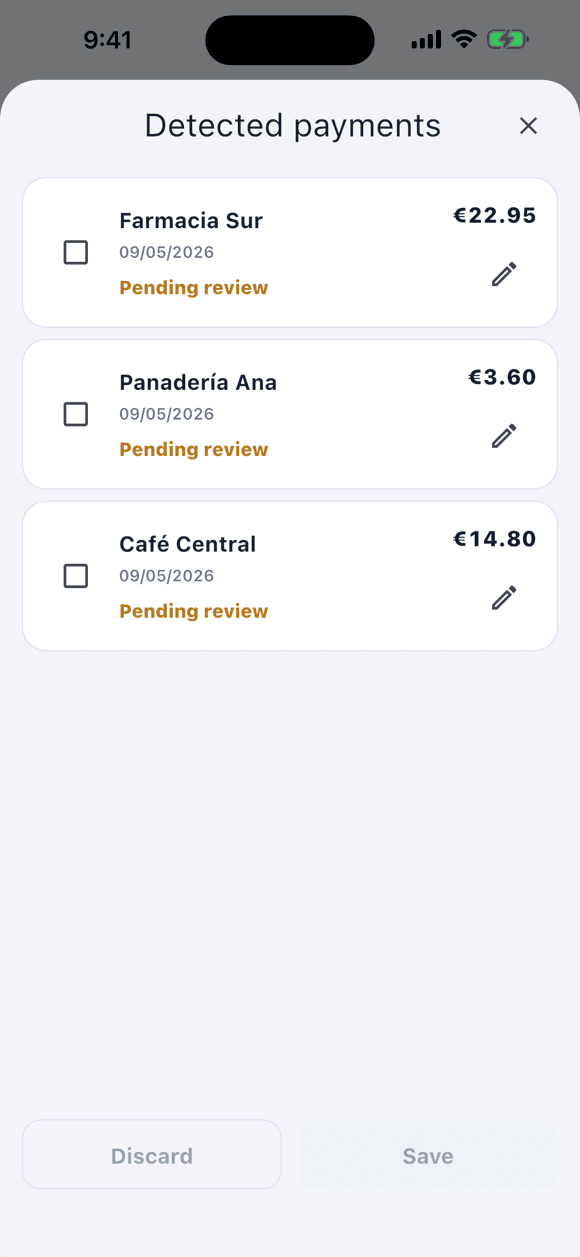
This is the important part and worth understanding before turning it on: Tally saves nothing on its own. Each detected payment sits in a tray called “Detected payments” and does not become a movement until you confirm it.
It is slower than bank sync, and that is the honest trade-off. In exchange, no third party sees your payments and there are no banking credentials anywhere.
- Opening Tally shows you the summary of payments waiting to be reviewed.
- For each one you can fix the amount, date, account, and category before saving.
- You can discard the ones you do not want: a discarded payment leaves no movement.
- Only new payments are captured, from the moment you turn it on: it does not import your Wallet history.
- The feature ships turned off and is enabled by hand from Settings.
ON IPHONE
Setting it up with Apple Pay
On iOS you create the automation yourself, in Apple's Shortcuts app. Tally does not read Apple Wallet and cannot create that automation on its own: it exposes an action, “Save pending payment in Tally”, and you decide when it runs.
It is five minutes of one-time setup. We are not going to tell you it is one tap, because it is not: it is the price of Apple not letting any app read Wallet directly, which is exactly the protection that makes this private.
Turn the feature on in TallyPRO
Settings › Automation. Requires Tally PRO. Tally opens a guide with these same steps.
Create an automation in Shortcuts
Open Shortcuts › Automation › New Automation and choose “Wallet”.
Pick your cards
Select the cards you want to track, choose “Run Immediately”, and tap Next. Cards you do not select produce nothing.
Add Tally's action
Tap “Create new shortcut”, search for Tally, and select its action.
Connect the data
In “Amount”, tap Select Variable › Shortcut Input › Amount. Repeat in “Merchant” with Merchant and save. This step is the fiddly one: skip it and the drafts arrive empty.
ON ANDROID
Setting it up with Google Wallet
Android has no Shortcuts, so the route is different: Google Wallet posts a notification when you pay, and you give Tally permission to read notifications. It is a broad permission, which is why Tally uses it as narrowly as possible.
- Tally filters by the Google Wallet package: any other notification is discarded instantly.
- Only three fields are read from the notification: amount, merchant, and currency.
- Full notifications and their original text are not stored.
- None of this leaves the phone.
Turn the feature on in TallyPRO
Settings › Automation. Requires Tally PRO. Before sending you to the system settings, Tally explains exactly what it will do with the permission.
Grant notification access
Tally opens the Android screen where it is granted. You can revoke it from there whenever you want.
Pay and review
Back in Tally you will see the detected payments, ready to review and save.
TO BE CLEAR
What it does not do, stated plainly
This is the easiest feature to describe badly, so here is the list of what does not happen. It is the same one you will see inside the app before turning it on.
- It does not read your bank: there is no bank connection anywhere in the app.
- It does not read Apple Wallet or “all of” Google Wallet: on iOS it receives what your automation sends it; on Android, only Google Wallet's notifications.
- It does not import your history: only payments after you enable it. For earlier months there is statement import.
- It saves nothing without you: every payment is a draft until you confirm it.
- It uploads nothing: the feature makes no network calls, and the draft is created and stored on the device.
- It does not guess the category with AI: it proposes one from what it knows about the merchant and you adjust it.
PRIVACY
The most private automation an expense app can have
Because the data does not travel. In an app with a bank connection, your movements pass through the bank, an aggregator, and the app's server. Here they go from your phone's operating system to a database on that same phone.
This is not a statement of intent: the feature contains no calls to the internet at all. Not to Tally's server, not to an analytics service, not to anyone. Put the phone in airplane mode and the drafts would still be created.
The permission is scoped by design too. On iOS you pick card by card in your own automation, and you can delete it whenever you want without touching Tally. On Android you can revoke notification access from the system settings. Either way you are in charge, and nothing needs uninstalling.
FREE AND PRO
What you need
Everything else
Manual logging, receipt photos with 1 AI analysis, three accounts, built-in categories, and statistics. Wallet automations are not available.
Wallet and the rest
Apple Wallet and Google Wallet automations, statement import, unlimited and event accounts, custom categories, unlimited AI analyses, and shared accounts.
FAQ
Frequently asked questions
Does Tally read my Apple Wallet or Google Wallet?
No. On iPhone, you create a Shortcuts automation that calls a Tally action when you pay with the cards you selected; Tally never accesses Wallet. On Android, Tally receives notifications and filters by the Google Wallet package, discarding anything else instantly.
Are expenses saved automatically?
No. They arrive as drafts in the “Detected payments” tray. You see them when you open Tally, you can fix amount, date, account, and category, and they only become movements when you confirm. You can also discard them.
Does any data leave my phone?
No. This feature makes no network calls: the payment becomes a draft and is stored on the device itself. It works the same in airplane mode.
Can I bring in payments from earlier months?
Not with this feature: it only captures new payments from the moment you enable it. To bring in history there is statement import, which is also PRO and also goes through your review.
Why does iPhone need Shortcuts setup and Android does not?
Because iOS does not let an app read Wallet, and the supported route is a personal automation you create. It is more work the first time, and it is precisely what stops any app from watching your payments without you knowing.
What happens if I grant notification access on Android?
It is a broad system permission, so Tally uses it as narrowly as possible: it filters by the Google Wallet package, reads only amount, merchant, and currency, does not store full notifications, and discards everything else. You can revoke it from Android settings at any time.
Does it work with any card or bank?
That depends on your Wallet, not on Tally. On iPhone it works with the cards you add to the Shortcuts automation; on Android, with payments Google Wallet posts a notification for. Tally has no relationship with any bank.
Is it free?
No. Wallet automations are part of Tally PRO, like statement import. The app itself and manual logging are free.
Keep reading
Keep going
Wallet is one of the four ways to log in Tally, and the only one that asks nothing of you at the moment you pay.
Start with Tally
Try it first, automate later
Download Tally, log a few expenses by hand, and see whether the flow fits you. Once you are sure, turn Wallet on from Settings.
The app is free · Wallet automations are Tally PRO · No bank connection